

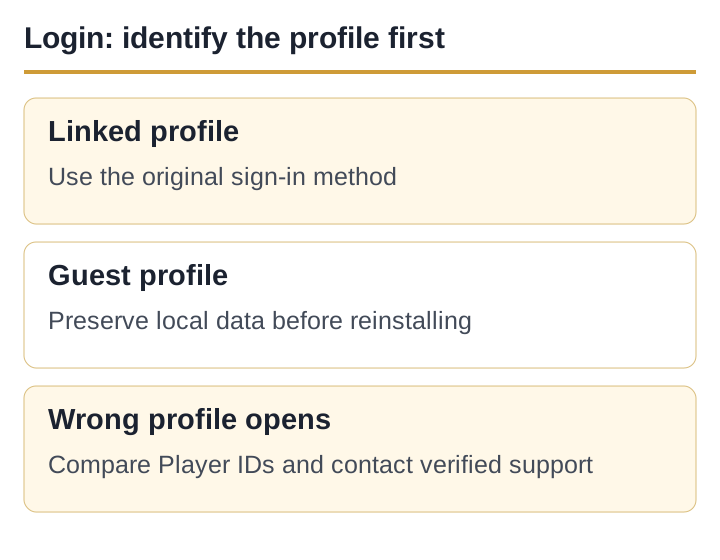
Which profile are you trying to recover?
Teen Patti apps do not all use the same login system. Do not apply another product’s account-recovery steps to Teen Patti Gold. Use only the methods displayed in your installed app and current developer help.
| Situation | Most useful evidence | Main risk |
|---|---|---|
| Linked sign-in previously used | The exact account identity and Player ID from the old profile. | Signing into a different account can create or open another profile. |
| Guest or unlinked play | Old device, visible ID, profile name and screenshots. | Local data may not transfer or be recoverable. |
| App opens a new profile | Both new and old Player IDs, if known. | Continuing on the new profile can confuse a recovery request. |
| Login control itself fails | Exact error, time, app version, Android version and network. | Repeated attempts can trigger a temporary security check. |
A successful sign-in can still open the wrong profile
Before resetting a password, confirm which account is active in the external identity app or browser on the phone. If more than one Facebook or Google identity is present, the app may receive a different identity from the one used earlier. The exact sign-in providers available in Teen Patti Gold must be read from the current app screen; this page does not assert a universal list.
- Stop on the unexpected profileDo not buy items or change the name while identity is unclear.
- Record both sidesSave the new Player ID and any old ID found in screenshots, emails or another device.
- Check the active identityVerify the same external account that was previously linked, without sending its password to anyone.
- Use the in-app sign-out routeOnly if one is clearly offered. Do not clear storage to imitate a sign-out.
Guest or unlinked profiles need a conservative approach
A guest profile may depend on data stored on one device. Because the current public store record does not promise recovery for every guest state, no editor can guarantee that support will restore it. Keep the old phone unchanged and online until the developer confirms the recovery path.
Do not clear storage, factory-reset the phone, uninstall the app or hand the phone to a remote-access “agent” while the only copy of an unlinked profile may be local.
If the old phone still opens the profile, capture the Player ID, profile name, approximate balance and settings screen. Link the profile only through controls inside the app linked from Moonfrog’s store listing; do not use a link sent in a WhatsApp message.
New phone and reinstall problems are identity problems first
Install the package linked from Moonfrog’s store listing, then use the same sign-in identity shown on the old phone. If a different profile appears, stop and compare IDs. Copying an APK file between phones does not copy the app’s server-side account or guarantee that local guest data moves with it.
If the old phone is unavailable, collect purchase receipts, approximate account creation period, previous device model and any screenshots that show the old Player ID. These details help the developer investigate; they are not proof that recovery is possible.
Safe login recovery order
- Check scopeDoes the app fail to open, or does only sign-in fail? Use the app-not-working guide for a crash.
- Save identifiersPlayer ID, profile name, old device and error screenshot.
- Verify the active external accountUse the same identity as before; never send its password or OTP.
- Restart without erasingForce stop, restart the phone and test once on a stable connection.
- Check the current versionUpdate through Moonfrog’s Play listing if an Update button appears.
- Contact the developerUse the contact route shown in the current Google Play listing or inside the app.
Copy this recovery evidence note
Old Player ID: [if known]
Profile name: [name]
Current/new Player ID: [if shown]
Old and current phone models: [models]
Sign-in method visible in the app: [method]
Last successful access: [approximate date]
Exact error or unexpected screen: [text]
Steps already tried: restart / network / update check
Attach a cropped screenshot only after hiding private notifications and payment details. A genuine support route does not need your password, OTP, UPI PIN or screen-control code.
Keep a record of what changed
Record the expected and current Player IDs, sign-in identity used, and the exact error before trying another recovery step. Keep passwords and OTPs out of this record.
Sources and claim boundaries
- Google Play Help: Contact an Android app’s developer — Google routes lost progress, save and app-specific account issues to the developer; accessed 5 September 2026.
- Current Teen Patti Gold Google Play record — package and developer contact; accessed 5 September 2026.
- Teen Patti Gold support verification — how to avoid copied phone numbers and fake recovery agents.
The available sign-in methods must be confirmed on your app screen. Recovery of an unlinked profile is not guaranteed.
Published and source-checked: 5 September 2026. Recheck time-sensitive app and policy details before treating them as current.